

New Bill Payment System – Coming Soon

Pay My Bill

Introducing our New Online System Powered by MyMeter and InvoiceCloud
What is new and when will it be available?
Pensacola Energy & Sanitation Services is introducing a new and improved account management and payment system on May 4, 2026, at https://myaccount.pensacolaenergy.gov. The new system will make managing your utility account easier, faster and more flexible than ever before. These enhancements are all about giving you more control and more ways to stay on top of your accounts.
Here’s what you can look forward to:
- More payment options: More payment options: Ability to choose from a wider range of payment types to fit your preferences.
- 24/7 account access: Check your balance, review past bills, and monitor your usage anytime, from anywhere.
- Simple, secure payments: Our system is designed to make transactions smoother while keeping your information safe.
- Easy account management: Set up automatic payments, update your information, and manage everything in one place.
We believe these changes will make your experience with us more convenient and user-friendly. Our goal is to provide tools that fit seamlessly into your daily life while continuing to deliver the reliable service you depend on.
Start by creating a user account on our online system then log in. These quick and easy steps will give you access to all the enhanced features and payment options available.
Frequently Asked Questions
General
Do I need to register for an online account?
To enjoy the features and capabilities offered by our new system, you need to create a new online user account at https://myaccount.pensacolaenergy.gov. An online account is not required to make one-time payments.
Will my old login work with the new online system?
No, all users must create an account on the new system at https://myaccount.pensacolaenergy.gov.
I had Auto Pay (or other payment schedule) in the previous system, will it be in the new system?
No, you will need to log in to the new online system to set up Auto Pay or other scheduled payments.
My equalized payment plan (EPP) payments are on bank draft, will my payments continue?
All previous bank draft plans managed by the City of Pensacola were stopped. To set up automatic payment for your EPP plan, you will register or log in to your online account to set up Schedule Payments.
Am I still signed up for e‑bill, and will I receive an email when my bill is ready?
Yes, if you were enrolled in e-billing, your paperless preference will carry over to the new system. You will receive an email when your bill is ready, along with additional payment reminder emails.
What are some of the benefits of receiving my bill electronically?
It is convenient, saves time and allows you to receive bills anywhere at any time. Plus, it is more secure than paper mail and it helps the environment.
What are some of the benefits of paying a bill online?
Paying online with a credit/debit card, electronic check or digital wallet gives you the flexibility to pay how and when you want. It saves the trouble of writing and mailing a check or driving by our office. In addition, for a faster payment experience, you may choose to store your information for future use.
Can I still pay by calling on the phone?
Yes, but there is a new number. Make payments or check account balances 24/7 using our automated phone system by dialing our new IVR number (833) 714-3598 (the previous phone number will be disconnected).
Is there an app for the online account management system?
Not at this time, but the MyMeter app for Pensacola Energy & Sanitation Services should be rolling out soon! Once available, information will be posted on our homepages and on social media sites. For now, you can access your online account through the browser on your mobile device.
Using the System
How do I access and navigate on the new Pensacola Energy & Sanitation Services system?
Visit the customer homepage at https://myaccount.pensacolaenergy.gov. This is where you can create an account, log in, or make a one-time guest payment. Feel free to explore by clicking on the additional links shown on this page to view our webpages, monthly bill inserts, and other related information.
To access online features, new users should select “Create an Account”; if you’ve already registered, enter your login information. Once signed in, you’ll be taken to your dashboard. This area displays account and usage information along with a natural gas usage or billing graph with customizable options.
Clickable main menu selections are on the top right of your Dashboard, these include:
• Dashboard • Alerts • Pay/Manage Accounts • Profile Icon
What options are available in the customer online account menus?
Dashboard: Used to view billing or natural gas usage history in a bar chart or data display, choose dollar or consumption amount, compare by adding temperature or heating degree days elements; view consumption by billing period or select hourly, daily, weekly or monthly data; view as a chart or in data form.
Alerts: Set up high or low Usage Threshold alerts to receive emails or texts so you can stay informed about your natural gas usage.
Pay/Manage Accounts menu options:
- Bill Delivery – sign up for or edit paperless billing option.
- Auto Pay – automatically pay your bill in full on the due date each month with the payment method you add or select from your wallet. (Equalized Payment Plan customers should select Schedule Payments, NOT Auto Pay.)
- Wallet – add, edit or delete saved payment methods.
- Schedule Payments – user defined recurring scheduled payments: select a fixed or variable amount, payment date, and number of payments or end date using a payment method saved in your wallet. Equalized Payment Plan customers must set up a recurring scheduled payment to match their EPP to pay automatically.
- Utility/Service Requests – use the drop-down menu to select a specific request, fill out the form and submit. Please allow 2 – 4 business days for processing (unless otherwise specified on the request).
- A grid on this page displays your transactions. Click on the Pay Bill button near the amount due to make a single payment and save payment methods to your wallet; you can also opt into Pay by Text while reviewing payment information.
Profile Icon: Click to access your User Profile, Customer Self Service, or Log Out.
- User Profile – Update your password or secret question, allow additional user access to your account, or connect additional Pensacola Energy and/or Sanitation accounts to your profile.
- Customer Self Service – Use the drop-down menu selection to submit a service request.
- Log out
I forgot my password; how do I access my account?
Click on “Forgot Your Password?” at the top of the login screen at https://myaccount.pensacolaenergy.gov. You will need your email address to reset your password. If you do not receive an email to reset your password, you may call us at 850-435-1800 and after verifying your identity, we will be able to assist.
How do I change my email address or user profile information?
Simply log in to your account at https://myaccount.pensacolaenergy.gov and click on the User Profile icon then User Profile. You can change your login email, add a mobile number, or update your password or secret question. If you are enrolled in paperless billing, your email address is automatically updated. If you have alerts set up, you will need to update your email address or phone number for each alert.
Do I need to create an online account to pay a bill?
No, an online account is not required for one-time payments. However, by creating an account online you’ll be able to view prior history, current usage, set up usage alerts and automatic payments, store payment information, submit service requests, go Paperless or elect to pay by text if desired.
What if I can’t locate my bill?
If you are a registered user, log in to your account at https://myaccount.pensacolaenergy.gov. From there, click on Pay/Manage Accounts or click the Pay Now button in the box that shows your account balance.
If you are not a registered user but know your customer-account number, click Create an Account or One-Time Payment on our online account management homepage. Your customer-account number must be an exact match; your name can be partially entered. For example: 123456-12345678, Smi (for Smith)
If you are not a registered user and don’t know your customer-account number, call our Customer Service Center at 850-435-1800.
How long will my payment history be maintained?
Initially, your online account will show about 15 months of history, but 24 months will be the standard retention period.
Will I be able to print a copy of my bill?
Yes, each invoice is presented in PDF format. Electronic storage is recommended because it saves paper and has a beneficial impact on our environment, but you can print the bill if needed.
Payments (processed by InvoiceCloud via MyMeter portal)
Do I have to enter an email address to make a one-time payment?
Yes, an email address is required so the payment confirmation can be delivered to your email inbox.
What forms of payment can I use?
You can pay using a credit or debit card, an electronic check from your bank account (checking or savings), or use PayPal, Venmo, Google Pay or Apple Pay (when paying from a compatible device).
Is there a service or convenience fee for card or e-check payments?
A non-refundable fee is added to an invoice to cover various administrative costs associated with billing and accepting your payment depending on the payment type. The service fee for credit/debit card and mobile wallet transactions is $2.75 per transaction. There is no service fee for electronic check (ACH/EFT) transactions.
Is there a maximum amount that can be paid per transaction?
Yes, there is a $500 limit for card and mobile wallet payments; e-checks (ACH/EFT) up to $125,000 can be processed. Please do not set up scheduled payments using a card for more than $500. Payments more than the transaction limit will fail to be processed.
Is there a minimum amount that can be paid per transaction?
No, there is no minimum.
Will my payment be submitted on the same day?
You decide when you want a single payment to be submitted. During the Pay Bill process, choose between Pay Today or Schedule a Payment for a future date.
How long does it take for online payments to process?
Credit card transactions are authorized immediately and typically take 48 hours to settle. ACH transactions typically take 48 – 72 hours.
Can I use more than one payment method per transaction?
Partial payments are accepted, but only one payment method can be used per transaction.
When I try to pay my bill, it asks for credit card information, but I want to pay by electronic check.
Under “How would you like to pay” click on the drop-down box and choose EFT Check.
Will I receive a confirmation email that my payment has been submitted?
Yes, you will receive a confirmation email.
How will I know that my payment has been accepted?
After you submit your payment, you will see a payment confirmation screen. It will contain your payment confirmation message and display an approved number for credit cards or a processed number for electronic checks. You will also receive a confirmation email after your transaction is submitted that includes the customer-account number, invoice number, amount paid and confirmation message.
At any time, log in to your online account at https://myaccount.pensacolaenergy.gov and select Pay/Manage Accounts to view your transaction history. It may take up to 24 hours for a payment to reflect on your account.
If your electronic check does not pass through the bank, you will receive an email informing you of the rejected payment.
How do I edit or change payment methods in my wallet?
Simply log in to your account at https://myaccount.pensacolaenergy.gov, click Pay/Manage Accounts and then the Wallet icon. You can add, delete, edit or set your default payment method.
Advanced Features
What is Auto Pay?
Auto Pay is a convenient option in which bills will be paid automatically for each billing cycle on the due date using your default credit card or bank account. Avoid late fees and free yourself from having to remember when to pay by logging in to your account at https://myaccount.pensacolaenergy.gov and enrolling in Auto Pay. This is equivalent to what was previously known as our Bank Draft or PAP plan.
NOTE: Equalized payment plan (EPP) customers should NOT use Auto Pay, a Schedule Payments / Recurring Scheduled Payments plan must be established instead of Auto Pay so that the correct plan amount is drawn each month.
What are benefits of Auto Pay?
- Payments are made automatically on the due date using the default payment method in your wallet
- Eliminate worries about missing a payment due date, incurring late fees or risking service interruption
- Get email notifications about your upcoming Auto Pay payment to ensure sufficient funds are available in your account
- Pay your way – use credit card, e-check, PayPal, Venmo, Google Pay or Apple Pay (on compatible device)
- Save time – you no longer need to write checks, buy stamps or make trips to the mailbox
- A greener way to pay
- Automatic payments are posted to your account faster than mailing in a payment
Can I cancel Auto Pay?
Yes. To cancel Auto Pay, log in at https://myaccount.pensacolaenergy.gov, go to Pay/Manage Accounts, select Auto Pay, click Edit, choose “No, I do not want autopay” and then click Save. Your status will update to “Not signed up” once the cancellation is complete.
How can I verify that I am enrolled in Auto Pay?
Log in to your account, click on Pay/Manage Accounts and then click on Auto Pay. Auto Pay box will open and display your account number, auto pay status, payment method and an Edit button to update your preferences.
What if I already have Auto Pay set up through my bank?
Auto Pay through your bank will continue to work. If you want to set up auto pay on our system using your online account, you will need to stop auto pay through your bank. Using auto pay through our online system allows you to have more flexibility and control over your payment methods along with convenient access to your bill, usage information, account alerts and more.
What if I was previously enrolled in the City’s bank draft plan?
All previous bank draft plans managed by the City of Pensacola were stopped. To set up auto pay to automatically pay your bill in full each month, simply register or log in to your online account and enroll in Auto Pay. Note: Previous users did not migrate from our old system and must register and enroll with our new system.
Will my existing equalized payment plan (EPP) continue to be drafted from my bank each month?
All previous bank draft plans managed by the City of Pensacola were stopped. To set up automatic payment for your EPP plan, register or log in to your online account and set up Schedule Payments / Recurring Scheduled Payments under the Pay/Manage Accounts menu option…do not enroll in auto pay.
What are Scheduled Payments?
Scheduled Payments are recurring payments that you set up to pay either a fixed amount or your full balance on the due date or other specified day of the month for a defined time duration or number of payments. The date of a scheduled payment can be changed if it is adjusted before the date scheduled. Scheduled Payments should be set up by equalized payment plan (EPP) customers for automated payments.
What is the difference between Auto Pay and Scheduled Payment?
Auto Pay is an automated process which pays your balance in full each billing cycle on the due date.
Scheduled Payments are automatic and follow a schedule determined by you for a fixed or variable amount on the date you selected for the number of payments you defined. NOTE: Scheduled Payments should be used by Equalized Payment Plan customers that wish to pay online automatically.
What is the difference between Scheduled Payments and Schedule a Payment?
Scheduled Payments are recurring payments for making multiple payments as set up by the user. These are set up in the Pay/Manage Account under the Schedule Payment option.
Schedule a Payment is an option for a single payment that is presented during the Pay Bill process, choose between Pay Today or Schedule a Payment for a future date.
If I elect my Bill Delivery to be Paperless, how will I receive my bills?
You will receive email notifications when a new bill is ready and just before the due date. Log in to your online account at https://myaccount.pensacolaenergy.govto view and pay the bill or set up Auto Pay. Email notifications go to the email address used to log in to your online account. If you opted into Pay by Text, you will also receive text messages at the number you entered while signing up for text payments.
What are benefits of going Paperless?
- Receive invoices, reminders and receipts via email
- Email reminders ensure you’re aware of upcoming due dates
- No paper bills in the mail improve privacy and security
- Reduce your carbon footprint / better for the environment
- Reduce clutter and waste – no more filing or shredding of invoices
How do I enroll in Paperless billing?
To enroll in paperless billing, log in to your online account at https://myaccount.pensacolaenergy.gov, select the Pay/Manage Accounts option, select Bill Delivery, click the box to add a checkmark in the Enroll box, click the box to enable Paperless and then save your changes.
If I enrolled in Paperless, can I start receiving paper bills again?
Yes, simply log onto your online account at https://myaccount.pensacolaenergy.gov, select the Pay/Manage Accounts option, then select Bill Delivery, uncheck the Enroll in Paperless box and then save your changes. If you decide to remain Paperless, you can print your bill anytime from your account.
What is Pay by Text?
Pay by Text is a convenient way to pay your bill by text message. When enrolled in Pay by Text, bill notifications will be sent by text message (this is in addition to email notifications) and you will have the option to pay via text message using the default payment method in your online account wallet by simply replying. Enroll in Pay by Text during the payment process while logged in to your account. Reminders can be set through Pay/Manage Accounts, Pay Bill, and the Remind Me option. The text reminder will contain information on how to pay your invoice.
Can more than one service address be linked to my online account?
Yes, there are two scenarios where accounts can be linked to your online user profile.
- Same customer number: When an online account is created, all active accounts that share the same customer number will be automatically linked and viewable under the Pay/Manage Accounts menu. You can view and pay any or all your Pensacola Energy & Sanitation Services pending bills with a single transaction. To view usage or bill data for the individual accounts on your Dashboard, click on Select Property to choose the account you want to view.
- Different customer number: If you are authorized to manage a gas or sanitation account that has a different customer number and there is not already an online account, you can use the Connect Additional Account under the User Profile menu to add that account to your online profile. You must have the exact name on the account and customer-account number. If a separate online account is needed in the future, you must go to your User Profile to delete that linked account.
Can I make a single payment for different accounts with different service addresses?
Yes, if the accounts are linked in your online profile. Log into your account, click on Pay/Manage Accounts and all pending invoices will be shown and selected by default. You can unselect or select any of the accounts by clicking on the box to the right of the amount due. Click on Pay Selected to initiate the payment process or view the bills.
Can I add additional users to my online account?
Yes, you can allow others to view your usage data as an additional user on your online account. In the User Profile section under Additional User Access, click on Connect User, select the permissions you want to grant (Usage is currently the only option), the duration of access, click to select your account, enter the additional user’s email address and enter it again to confirm, then click continue. Once the additional user accepts the invitation, they will be able to view your account usage only; to make a payment, they will need to log out of the account and use the One-Time Payment option.
How do I submit a Utility Service Request?
Utility Service Requests for your natural gas service and your City of Pensacola sanitation services can be submitted through your online account by selecting the User Profile icon and selecting Customer Self Service or go to Pay/Manage Account and select Utility/Service Requests. Once a request is submitted, our team will review and process your request. Please allow 2-4 business days for processing.
Can I delete my online account?
Yes, log in to your account at https://myaccount.pensacolaenergy.gov, click on User Profile, scroll down to the bottom and click to enter an X by the delete user option, confirm to save.
Security
Is my information secure?
Our payment processor Invoice Cloud uses the highest standards in internet security. Account information displayed within the payment system is truncated to protect confidential data. Any information retained is not shared with third parties.
Is my credit card and banking account information safe when I pay online?
Absolutely. Invoice Cloud will safely store your financial information using Payment Card Industry (PCI) Compliant systems. This includes truncating (abbreviating) account numbers so that even we do not see your complete account information.
What is PCI Compliance and why is it so important?
PCI stands for Payment Card Industry, and compliance with the industry standards is a requirement for those that accept the major credit cards and for software providers who have applications which involve the transmission and/or storage of credit card information.
What is PCI Compliance and why is it so important?
PCI stands for Payment Card Industry, and compliance with the industry standards is a requirement for those that accept the major credit cards and for software providers who have applications which involve the transmission and/or storage of credit card information.
Paying Your Natural Gas Bill
We have made it very convenient for you to pay your natural gas bill each month. You can make your payment in any of the following ways:
- Online – using debit or credit card or echeck. Click here.
- By mail – to the address shown on your bill.
City Hall
P O Box 12910
Pensacola, FL 32521-0044 - By phone (IVR): 833-714-3598
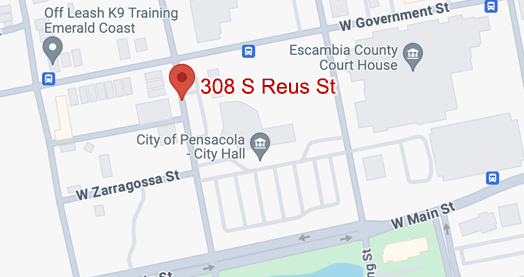
- In person – City of Pensacola Customer Service Center, 308 S. Reus Street
- A night drop payment repository is available outside of the Customer Service Center. Do not place cash payments in the night drop repository.